복수개의 셀렉터 연속 지정 가능, 쉼표로 구분
table , th , td {
border : 1px solid black ;
border-collapse : collapse ;
}
1. 전체 셀렉터
* : html 모든 요소 선택
2. 태그 셀렉터
지정된 태그명 가지는 요소 선택
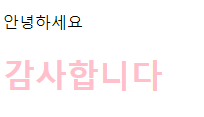
선택 범위 겹칠 경우, 범위 작은 요소의 스타일 적용됨
< head >
< style >
* {
color : pink ;
}
p {
color : black ;
}
</ style >
</ head >
< body >
< p > 안녕하세요 </ p >
< h1 > 감사합니다 </ h1 >
3. ID 셀렉터
#id 어트리뷰트값
id 지정해 일치하는 요소 선택, 중복X 유일값
4.클래스 셀렉터
.class 어트리뷰트값
클래스 지정해 일치하는 요소 선택
공백으로 구분해 여러개 지정 가능
.text-center { text-align : center ; }
.text-large { font-size : 200% ; }
.text-pink { color : pink ;}
< p class = "text-center text-large text-pink" > Center large pink </ p >
5. 어트리뷰트 셀렉터
셀렉터[어트리뷰트]
지정된 어트리뷰트 갖는 모든 요소 선택
셀렉터[어트리뷰트="값"]
지정된 어트리뷰트를 가지고 지정된 값과 어트리뷰트 값이 일치하는 요소 선택
a [ target = "_blank" ]{
color : orange ;
}
셀렉터[어트리뷰트~="값"]
지정된 어트리뷰트 값이 지정된 값(공백으로 분리된) 단어로 포함하는 요소 선택
h1 [ title ~= "first" ] { color : red ; }
< h1 title = "heading first" > Heading first </ h1 >
셀렉터[어트리뷰트|="값"
지정된 어트리뷰트의 값과 일치하거나 연이은 하이픈으로 시작하는 요소 선택
p [ lang |= "en" ] { color : red ; }
< p lang = "en" > Hello! </ p >
< p lang = "en-us" > Hi! </ p >
< p lang = "en-gb" > Ello! </ p >
셀렉터[어트리뷰트^="값"]
지정된 어트리뷰트 값으로 시작하는 요소 선택
a [ href ^= "https://" ] { color : red ; }
셀렉터[어트리뷰트$="값"]
지정된 어트리뷰트 값으로 끝나는 요소 선택
a [ href $= ".html" ] { color : red ; }
< a href = "test.html" > test.html </ a >< br >
셀렉터[어트리뷰트*="값"]
지정된 어트리뷰트 값을 포함하는 요소 선택
div [ class *= "test" ] { color : red ; }
< div class = "first_test" > The first div element. </ div >
< div class = "test" > The third div element. </ div >
6. 복합 셀렉터
6.1 후손 셀렉터
자신의 1레벨 상위에 속하는 요소를 부모요소, 1레벨 하위에 속하는 요소를 자손 요소
자신보다 n 레벨 하위에 속하는 요소는 후손요소
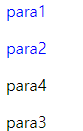
div 요소의 후손 요소 중 p 요소
< div >
< p > para1 </ p >
< p > para2 </ p >
</ div >
< p > para3 </ p >
6.2 자식 셀렉터
< div >
< p > para1 </ p >
< p > para2 </ p >
< span >< p > para4 </ p ></ span >
</ div >
< p > para3 </ p >
div 요소 중 자신의 1레벨 아래(자식) 셀렉터만 선택
6.3 형제 셀렉터
형제 관계에서 뒤에 위치하는 요소 선택
6.3.1 인접 형제 셀렉터
셀렉터 A+셀렉터B
형제 요소 중 A 셀렉터 바로 뒤에 위치하는 B 선택, 다른 요소 존재하면 선택되지 않음
p + ul { color : yellow ;}
< p > The first paragraph. </ p >
< ul >
< li > Coffee </ li >
< li > Tea </ li >
< li > Milk </ li >
</ ul >
6.3.2 일반 형제 셀렉터
셀렉터 A ~ 셀렉터B
A 요소의 형제 중 A요소 뒤에 위치하는 B 요소 모두 선택
p ~ ul { color : yellow ; }
< p > The first paragraph. </ p >
< ul >
< li > Coffee </ li >
< li > Tea </ li >
< li > Milk </ li >
</ ul >
< h2 > Another list </ h2 >
< ul >
< li > Coffee </ li >
< li > Tea </ li >
< li > Milk </ li >
</ ul >
7. 가상 클래스 셀렉터
특정 상태에 따라 스타일 정의할 때 사용 ex) 마우스 올라와있을때, 링크 방문/미방문 시
가상 클래스는 :(콜론) 사용, css 표준에 의해 미리 정의된 이름 존재>임의 이름X
< head >
< style >
a:hover { color : red ;}
input:focus { background-color : yellow ;}
</ style >
</ head >
< body >
< a href = "#" > Hover me </ a >< br >< br >
< input type = "text" placeholder = "focus me" >
</ body >
7.1 링크 셀렉터, 동적 셀렉터
:link 방문하지 않은 링크
:visited 방문한 링크
:hover 마우스가 올라와있을 때
:active 클릭된 상태일 때
:focus 포스터가 들어와있을 때
a:visited { color : green ;}
a:hover { font-weight : bold ; }
a:active { color : blue ; }
input [ type = text ] :focus ,
input [ type = password ] :focus {
color : red ;
}
< a href = "#" > Hover me </ a >< br >< br >
< input type = "text" value = "I'll be red when focused" >< br >
< input type = "password" value = "I'll be red when focused" >
7.2 ui 요소 상태 셀렉터
:checked 체크 상태일 때
:enabled 사용 가능한 상태일 때
:disabled 사용 불가능한 상태일 때
< head >
< style >
/*input 요소 사용 가능한 상태일 때,
input 요소 바로 뒤에 위치하는 인접 형제 span 요소 선택*/
input:enabled + span {
color : blue ;
}
/*input 사용 불가능한 상태일 때,
input 요소 바로 뒤에 위치하는 인접 형제 span 요소를 선택*/
input:disabled + span {
color : gray ;
text-decoration : line-through ;
}
/*input 요소가 체크 상태일 때,
input 요소 바로 뒤에 위치하는 인접 형제 span 요소 선택*/
input:checked + span {
color : red ;
}
</ style >
</ head >
< body >
< input type = "radio" checked = "checked" value = "male" name = "gender" >< span > Male </ span >< br >
< input type = "radio" value = "female" name = "gender" >< span > Female </ span >< br >
< input type = "radio" value = "neuter" name = "gender" disabled >< span > Neuter </ span >< hr >
< input type = "checkbox" checked = "checked" value = "bicycle" >< span > I have a bicycle </ span >< br >
< input type = "checkbox" value = "car" >< span > I have a car </ span >< br >
< input type = "checkbox" value = "motorcycle" disabled >< span > I have a motorcycle </ span >
</ body >
7.3 구조 가상 클래스 셀렉터
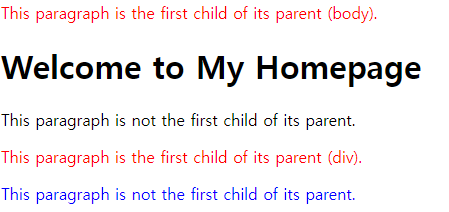
:first-child 셀렉터에 해당하는 요소 중 첫번째 자식인 요소
:last-child 셀렉터에 해당하는 요소 중 마지막 자식인 요소
< head >
< style >
p:first-child { color : red ;}
p:last-child { color : blue ;}
</ style >
</ head >
< body >
< p > This paragraph is the first child of its parent (body). </ p >
< h1 > Welcome to My Homepage </ h1 >
< p > This paragraph is not the first child of its parent. </ p >
< div >
< p > This paragraph is the first child of its parent (div). </ p >
< p > This paragraph is not the first child of its parent. </ p >
</ div >
</ body >
(div)는 div의 첫번째 자식이므로
:nth-child(n) 셀렉터에 해당하는 요소 중 n번째 자식인 요소 선택
:nth-last-child(n) 셀렉터 해당하는 요소 중 뒤에서 n번째 자식인 요소 선택
<! DOCTYPE html >
< html >
< head >
< style >
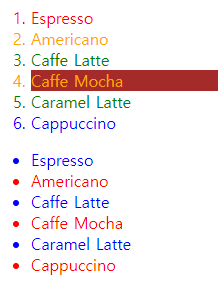
/*ol 요소의 자식 요소인 li 요소 중에서 짝수번째 요소만을 선택*/
ol > li:nth-child ( 2n ){ color : orange ;}
/*ol 요소의 자식 요소인 li 요소 중에서 홀수번째 요소만을 선택*/
ol > li:nth-child ( 2n+1 ){ color : green ;}
/*ol 요소의 자식 요소인 li 요소 중에서 첫번째 요소만을 선택*/
ol > li:first-child { color : red ;}
/*ol 요소의 자식 요소인 li 요소 중에서 마지막 요소만을 선택*/
ol > li:last-child { color : blue ;}
/*ol 요소의 자식 요소인 li 요소 중에서 4번째 요소만을 선택*/
ol > li:nth-child ( 4 ){ background-color : brown ;}
/*ul의 모든 자식요소 중 뒤에서 시작하여 홀수번째 요소만을 선택*/
ul > :nth-last-child ( 2n+1 ){ color : red ;}
/*ul의 모든 자식요소 중 뒤에서 시작하여 짝수번째 요소만을 선택*/
ul > :nth-last-child ( 2n ){ color : blue ;}
</ style >
</ head >
< body >
< ol >
< li > Espresso </ li >
< li > Americano </ li >
< li > Caffe Latte </ li >
< li > Caffe Mocha </ li >
< li > Caramel Latte </ li >
< li > Cappuccino </ li >
</ ol >
< ul >
< li > Espresso </ li >
< li > Americano </ li >
< li > Caffe Latte </ li >
< li > Caffe Mocha </ li >
< li > Caramel Latte </ li >
< li > Cappuccino </ li >
</ ul >
</ body >
</ html >
:first-of-type 셀렉터에 해당하는 부모요소의 자식 요소 중 첫번째 등장하는 요소
:last-of-type 셀렉터에 해당하는 부모요소의 자식 요소 중 마지막에 등장하는 요소
:nth-of-type(n) 셀렉터에 해당하는 부모요소의 자식 요소 중 앞에서 n번째에 등장하는 요소
:nth-last-of-type(n) 셀렉터에 해당하는 부모요소의 자식 요소 중 뒤에서 n번째에 등장하는 요소
<! DOCTYPE html >
< html >
< head >
< style >
/*p 요소의 부모 요소의 자식 요소 중 첫번째 등장하는 p요소*/
p:first-of-type { color : red ;}
/*p 요소의 부모 요소의 자식 요소 중 마지막 등장하는 p요소*/
p:last-of-type { color : blue ;}
/*p 요소의 부모 요소의 자식 요소 중 앞에서 2번째에 등장하는 p요소*/
p:nth-of-type ( 2 ){ color : green ;}
/*p 요소의 부모요소의 자식 요소 중 뒤에서 2번쨰에 등장하는 p요소*/
p:nth-last-of-type ( 2 ){ color : orange ;}
/*p 요소 중에서 첫번째 자식을 선택*/
p:first-child { background : brown ;}
</ style >
</ head >
< body >
< h1 > This is a heading </ h1 >
< p > The first paragraph. </ p >
< span > dsafdsf </ span >
< p > The second paragraph. </ p >
< p > The third paragraph. </ p >
< p > The fourth paragraph. </ p >
< div >
< h1 > This is a heading </ h1 >
< p > The first paragraph. </ p >
< p > The second paragraph. </ p >
< p > The third paragraph. </ p >
< span > dsfdsf </ span >
< p > The fourth paragraph. </ p >
</ div >
</ body >
</ html >
- nth-child와 nth-of-type의 차이
nth-child : 선택자와 같은 형제 중에서 n번째
nth-of-type : 선택자와 같은 선택자 중에 형제 중 n번째
7.4 부정 셀렉터
:not 셀렉터에 해당하지 않는 모든 요소 선택
<! DOCTYPE html >
< html >
< head >
< style >
/*input 요소 중에서 type 어트리뷰트 값이 password 아닌 요소 선택*/
input:not ([ type = password ]){
background-color : yellow ;
}
</ style >
</ head >
< body >
< input type = "text" value = "Text input" >
< input type = "email" value = "email input" >
< input type = "password" value = "Password input" >
</ body >
</ html >
div:not ( :nth-of-type ( 3n+1 )) {
margin-left : 2% ;
}
7.5 정합성 체크 셀렉터
:vaild 정합성 검증이 성공한 input 요소 또는 form 요소 선택
:invaild 정합성 검증이 실패한 input 요소 또는 form 요소 선택
input [ type = "text" ] :valid {
background-color : greenyellow ;
}
input [ type = "text" ] :invalid {
background-color : red ;
}
<label> </label>
label은 폼의 양식에 이름 붙이는 태그이다.
< label > 입력값이 반드시 필요
< input type = "text" required >
</ label >
< br >
< label > 특수문자를 포함하지 않는 4자리 문자 또는 숫자
< input type = "text" value = "ab1!" pattern = "[a-zA-Z0-9]{4}" required >
</ label >
< br >
< label > 핸드폰 번호 형식
< input type = "text" value = "010-1111-2222" pattern = "^\d{3}-\d{3,4}-\d{4}$" required >
</ label >
8. 가상 요소 셀렉터
::first-letter 콘텐츠의 첫글자
::first-line 첫줄 선택, 블록 요소에만 적용 가능
::after 뒤에 위치하는 공간, 일반적으로 content와 함께 사용
::before 앞에 위치하는 공간, 일반적으로 content와 함께 사용
::selection 드래그한 콘텐츠, 일부 브라우저에서 동작X
< style >
/*p요소 콘텐츠의 첫글자를 선택*/
p::first-letter { font-size : 3em ;}
/*p 요소 콘텐츠의 첫줄을 선택*/
p::first-line { color : red ;}
/*h1 요소 콘텐츠의 앞 공간에 content 어트리뷰트 값을 삽입한다*/
h1::before {
content : "HTML!!!" ;
color : blue ;
}
/*h1 요소 콘텐츠의 뒷 공간에 content 어트리뷰트 값을 삽입*/
h1::after {
content : "CSS3!!!" ;
color : red ;
}
/*드래그한 콘텐츠를 선택*/
::selection {
color : red ;
background : yellow ;
}
</ style >
< h1 > This is a heading </ h1 >
< p > Lorem ipsum dolor sit amet, consectetur adipisicing elit. Explicabo illum sunt distinctio sed, tempore, repellat rerum et ea laborum voluptatum! Quisquam error fugiat debitis maiores officiis, tenetur ullam amet in! </ p >
< h1 > This is a heading </ h1 >